
LicenseQ helps you secure the best terms for your Microsoft agreements, such as the Enterprise Agreement, CSP, or MCA-E.
Microsoft Licensing Update Feb 2026, incl. Teams, PowerApps, Project Online and more

Author:
Jeroen Hidding
Jeroen entered Microsoft Licensing in 2008 at a Global LSP. Jeroen is specialized in optimizing complex Microsoft licensing requirements from a commercial perspective.
You are now reading:
Microsoft Licensing Update ... Microsoft Licensing Update Feb 2026, incl. Teams, PowerApps, Project Online and more
Author:
Jeroen Hidding
Welcome to this month’s Microsoft Licensing Update with key changes to be aware of for your 2026 licensing strategy.
Teams Updates
Starting April 1st, 2026 Microsoft is expanding the functionality in Teams licensing.
Within Teams you can expect improved functionality across Microsoft Places and Teams town halls and webinars.
These updates are included in the Teams license, which is part of the Microsoft suites that provide access to calendars in both Outlook and Teams (including M365 E3, E5, Business editions and several standalone editions).
Some of the updates are:
- Room finder replaced by Places finder: this enables people to find any place and not just a whole meeting room.
- Teams Shared Devices renamed to Teams Shared Space with new functionality: Space management capabilities with options to book desks, space management by admins, space analytics for inventory and utilization reports for licensed shared spaces and integration with third party API’s with spatial data, floorplans etc.
- Introduction of attendee packs for town hall events (starting at 5,000 attendees up to 100,000)
Changes in Project Online
As of September 30th, 2026, Project Online will be decommissioned.
At the moment, access to the Project Online environment is also included with Planner and Project P3/P5 licenses, and this service will be retired on the same date.
The Project Desktop applications will remain available for users with P3 and P5 licenses after September 30th, 2026, but without access to the Project Online services.
Microsoft is providing three alternatives:
1. Microsoft Planner
The successor to Project Online is Microsoft Planner. Basic functionality is included in your Microsoft 365 subscription, and for Project Essentials users there is already an upgrade path to Planner P1.
2. Project Server (On-Premises)
The on-premises version of Project Server will remain available, making it a suitable option for organizations that require advanced project and portfolio management or a feature set comparable to what Project Online previously offered. Access to Project Server is provided through a Project Server CAL or via Planner and Project Plan 3 or Plan 5 licenses.
3. Dynamics 365 Project Operations
If you require robust timesheet tracking and resource planning, Dynamics 365 Project Operations is another available option.
Why does this matter?
All end users working with Project Online, Project Online Essentials, P3 and P5 users using the Project Online environment are impacted with this change and an alternative license is required.
Retirement of standalone SharePoint Online and OneDrive plans
Although most customers are already licensed via a suite for the SharePoint Online and OneDrive for Business subscriptions, starting June 1st, 2026 the standalone SKU’s will no longer be available as a new standalone subscription purchase.
Do you require a renewal? For these subscriptions that is possible until January 2027. After December 2029, the standalone SKU’s will be fully retired and customers need to switch to the available O365 or M365 suites.
Why does this matter?
Customers with a M365 F3 license who require additional OneDrive storage or SharePoint P1 functionality will see a dramatic price increase.
Update Power Apps per App
Starting from this year the Power Apps license is no longer available as a per App license.
For CSP and EA customers already using this license, Microsoft will continue to offer the option to renew it at contract renewal.
For every new (or MPSA) customer the only option is to choose Power Apps Premium which provides a license for the use of an unlimited amount of apps.
Why does this matter?
Customers wanting to start with a low-entry licensing model no longer have this option and can only start with the fully loaded license.
Reminder: Price updates as of February 1st and July 1st
Although such changes are rare, Microsoft has adjusted pricing for all online subscriptions in response to exchange rate fluctuations. Effective February 1st, cloud subscription prices were reduced by 7.4%.
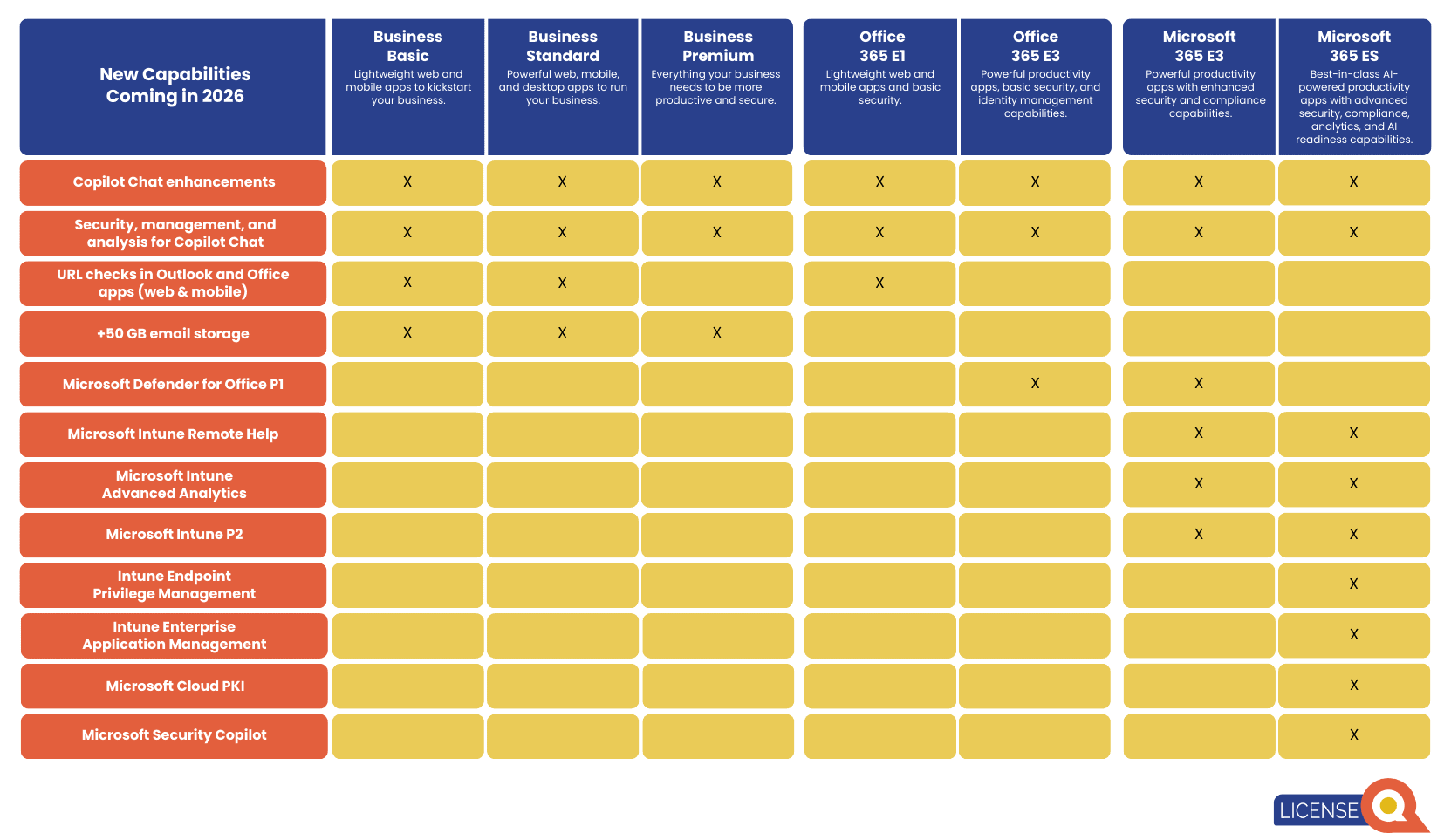
Starting July 2026 Microsoft is adding functionality to the Office 365 and Microsoft 365 suites which comes with an price increase:

Updates Microsoft Product Terms
Just a few small updates here:
Microsoft Customer Agreement
Further functionality included in the MCA contract: Microsoft added Defender for EndPoint P2 Add-On for Microsoft 365 E3 and Microsoft Entra ID P2 Add-On for Microsoft 365 E3 to the MCA table and License Prerequisites table.
Dragon Copilot
Microsoft added Dragon Copilot Physician Practice Per User to the MCA Availability table and an additional clause created to clarify tenant deployments
In the Netherlands, this means customers have a choice between Dragon Copilot and Dragon Copilot Flex subscription. The flex subscription is less expensive, however the usage of ambient and GenAI features will be paid via Pay-as-you-go consumption.
For US customers there is already a special license for nurses, Dragon Copilot Nursing. The expectation is that this will become available in Europe as well.